



Most agencies don't fail at technology because they picked the wrong platform. They fail because the rollout had no structure behind it. The software gets purchased, a few people get logins, an email goes out saying "we're live Monday," and three weeks later half the team is quietly back in their old spreadsheets while the CSRs are double-entering data into both systems just to survive the week.
That's not a software problem. That's a change management problem — and it's one of the most expensive quiet failures in an agency's operation. You pay for the license. You pay for the implementation. And then you pay again in lost productivity because nobody owned the human side of the switch.
Agency technology change management is the discipline of moving your team, your data, and your daily workflows onto a new system without letting the business lose a step. Below is a six-stage playbook built specifically for how insurance agencies actually run — where a dropped renewal, a mis-keyed endorsement, or a confused producer costs real money.
Why rollouts break inside agencies specifically
Agencies have a structural problem that most small businesses don't: your workflows are chained together across roles, and a lot of them run on tribal knowledge.
A producer sells. A CSR services. An account manager handles renewals. Accounting reconciles commissions. Each of those people touches the same policy at different stages, and each one has their own little workarounds built up over years. When you change the system underneath them, you're not changing one person's habits — you're changing a relay race where every handoff still has to work.
The pattern that shows up over and over: the owner evaluates and buys the tool. The owner understands why it's better. But the owner doesn't service 180 accounts a day. The CSR does. And the CSR was never asked what their actual daily friction points were, so the new system "improves" things that weren't broken while ignoring the three clicks that eat an hour of their day.
What breaks at scale is coordination. In a two-person agency, you can lean over and say "hey, we're doing it this way now." In a 15-person shop with two branches and a remote team, that informal communication collapses. Some people are on the new system, some aren't, and the renewal that was supposed to get worked on last Tuesday is sitting in nobody's queue because it fell between the old process and the new one.
The six stages below are designed to close those gaps on purpose rather than hoping they close themselves.
Stage 1: Stakeholder mapping (before anyone touches the software)
Before you talk rollout dates, you need to know exactly who is affected and how they're affected. Not just "the CSR team." Specifically: which workflows each role owns, which handoffs they depend on, and what will physically change in their day.
Eliminate paperwork bottlenecks and missed deadlines.
Covixly helps you track, manage, and close every policy and claim with confidence and speed.
- Unified policy & claims management
- Automated client notifications
- Agent task coordination
No credit card required
| Role | What they own | Primary risk during switch |
|---|---|---|
| Producer | New business intake, quoting | Pipeline visibility disappears mid-deal |
| CSR | Endorsements, service requests, COIs | Double data entry, slower turnaround |
| Account Manager | Renewal prep and remarketing | Renewals falling into a workflow gap |
| Accounting | Commission reconciliation | Broken data feeds, missing records |
| Owner / Ops lead | Oversight, reporting | No visibility into adoption rate |
The point of this table isn't to look organized. It's to surface the handoffs. The riskiest moments in any agency tech change aren't inside a single role — they're at the seams, where a producer hands a sold policy to a CSR, or an account manager passes a renewal back to a producer.
One more thing that gets skipped: identify your informal influencers. Every agency has one or two people the rest of the team quietly copies. If that person resists the new system, adoption stalls no matter what the org chart says. If that person champions it, half your rollout work is done for you. Map them early and bring them in before launch, not after.
For agencies running multiple locations, this stage gets heavier, and the governance side of it connects directly to how you already standardize across branches. If you've built out branch-level KPI rollups and governance, that structure becomes the backbone for coordinating a tech change across sites — something worth revisiting in the context of operating multiple branches without chaos.
Stage 2: Pilot design with rollback gates
The single biggest mistake in agency rollouts is going all-in on day one. You don't flip the whole agency onto a new system and hope. You run a contained pilot with a clear scope, a small group, and — this is the part everyone forgets — a defined way to pull back out if it goes sideways.
A rollback gate is a pre-agreed condition that, if hit, triggers an immediate pause or reversal. Without one, you get sunk-cost paralysis: the system is clearly causing problems, but nobody wants to be the one to admit it after all that money and setup. So the agency limps along in a broken half-state for months.
A pilot scope template that actually works
-
Scope One line of business (say, personal auto renewals) handled by 2–3 people
-
Duration 3 to 4 weeks, not open-ended
-
Parallel period Run old and new side-by-side for the first week only — any longer and people never let go of the old one
-
Data boundary Define exactly which records enter the pilot and which stay out
-
Owner One named person responsible for the pilot, not a committee
Rollback rules — write these down before you start
-
If renewal turnaround time slips more than ~30% beyond baseline for two consecutive weeks, pause and diagnose.
-
If any policy issuance or endorsement error is traced directly to the new workflow, stop intake into the system until the gap is fixed.
-
If more than a third of the pilot group is still defaulting to the old process by week two, treat it as a training or design failure, not a people failure.
-
If a carrier-facing or client-facing deliverable (COI, ID card, binder) gets delayed because of the tool, that's an immediate rollback trigger — client impact overrides everything.
The discipline here is deciding the thresholds in advance, when you're calm and objective, instead of arguing about them in the middle of a bad week when everyone's emotional and defensive.
Stage 3: Role-specific success metrics
"Did the rollout go well?" is a useless question because it has no real answer. Different roles succeed in different ways, and if you measure the whole thing with one number, you'll miss where it's actually breaking.
-
Producer quote-to-bind time, number of open opportunities with clear status, time spent on data entry vs. selling
-
CSR average handle time per service request, double-entry incidents per week, endorsement turnaround
-
Account Manager renewals worked on-time rate, remarketing completion before expiration, handoff gaps caught
-
Accounting commission reconciliation time, mismatched records per cycle
-
Ops / Owner adoption rate (% actively using the new system), exception volume, support tickets per person
The pattern worth watching: adoption rate and error rate usually move in opposite directions early on. When people are first learning, errors spike and adoption looks low. That's normal. What you're watching for is whether both curves bend the right way by week three. If adoption is climbing and errors are falling together, you're winning. If adoption is climbing but errors are flat or rising, the workflow design is wrong — not the training.
This is also where connecting your rollout to your underlying process map pays off. If you've already defined roles, handoffs, and stage KPIs for how policies move through your shop — the kind of structure laid out in an operational blueprint for policy lifecycle management — your success metrics almost write themselves, because you already know what "good" looks like at each stage.
Stage 4: The communication calendar
Most rollout communication is one email and a prayer. Then the questions start flooding in, people feel blindsided, and resistance hardens because nobody told them why this was happening or what's in it for them.
A communication calendar is just a schedule of what gets said, to whom, and when — mapped across the rollout timeline. It turns a chaotic scramble into a predictable rhythm.
Different messages land at different times. Telling people the vision three weeks before launch is useless because they'll forget it. Telling them the mechanics three weeks early is also useless because it's not real to them yet. You sequence it.
A practical cadence:
-
4 weeks out The why. What problem this solves, what changes, and an honest acknowledgment that the first few weeks will be bumpy.
-
2 weeks out The who and when. Pilot group named, dates confirmed, expectations for the parallel-run week.
-
Launch week Daily touchpoints. A quick 10-minute standup or async check-in to surface friction fast.
-
Weeks 1–3 post-launch Weekly recap showing the metrics — adoption climbing, errors dropping — so people see it working and don't rely on the loudest complainer's vibe.
-
End of pilot The decision. Go wider, adjust, or roll back. Say it clearly either way.
One habit that pays off disproportionately: publicly surface and fix the first few complaints fast. When the team sees that raising a problem gets it solved within a day or two, they keep reporting issues instead of silently reverting to the old system. When the first complaint gets ignored, everyone stops reporting and starts working around the tool — and now you're flying blind.
Publicly fix the first few complaints fast—aim for same-day or next-day fixes to keep reporting channels open.
When the team sees that raising a problem gets it solved within a day or two, they keep reporting issues instead of silently reverting to the old system.
Stage 5: Vendor-onboarding alignment
Here's a gap that bites agencies constantly: the vendor's onboarding plan and your internal rollout plan are two different documents that never talk to each other.
The vendor has a standard implementation checklist — data migration, configuration, training sessions. Your agency has its renewal cycles, its busy seasons, its staffing realities. When those two timelines aren't aligned, you end up scheduling your big training session the same week three large commercial renewals are due, and nothing gets learned because everyone's drowning.
Alignment means sitting down with the vendor and mapping their milestones against your operational calendar:
-
When is your data clean enough to migrate? (If it isn't, fix that first — migrating messy data just moves the mess.)
-
Which training sessions land in your lighter weeks, not your renewal crunches?
-
Who on your side owns the relationship so the vendor isn't bouncing between five people?
-
What does the vendor commit to during the critical first two weeks — and what happens if their support response time is slow during a rollback-trigger moment?
A lot of this traces back to how you selected the vendor in the first place. If you ran a disciplined evaluation with a clear scorecard and sunset plan, you already have the leverage and the documented expectations to hold onboarding accountable. If you're still in the selection phase, it's worth getting that part right first using an agency tech vendor selection framework before worrying about rollout mechanics.
One observation worth sitting with: vendors who push hardest for a fast, full launch are usually optimizing for their implementation close date, not your operational safety. A good vendor will support a phased pilot with rollback gates. If a vendor resists that, treat it as information.
Stage 6: The 30/60/90 rollout calendar mapped to ops KPIs
Once the pilot proves out, you expand in phases tied to measurable outcomes — not to the calendar for its own sake. Each phase has a goal, a scope, and the KPIs that tell you whether you're allowed to move to the next one.
-
Days 0–30
Prove it with the pilot group
- Scope: one line of business, small team - KPI focus: adoption rate climbing toward the majority of the pilot group, error rate returning to or below baseline, no client-facing delays - Gate to advance: pilot metrics stable for at least one full week -
Days 31–60
Expand by role and line
- Scope: roll out to the full team for the proven workflow, then add a second line of business - KPI focus: CSR handle time trending down, renewal on-time rate holding steady, double-entry incidents near zero - Gate to advance: no regression in service turnaround, support tickets declining -
Days 61–90
Full operation and old-system sunset
- Scope: all core workflows live, old system read-only then retired - KPI focus: commission reconciliation time improving, exception volume stabilizing, producer time-on-selling increasing - Gate to complete: team-wide adoption, old system officially decommissioned with a documented cutoff date
Here's a quick visual of the phased rollout.
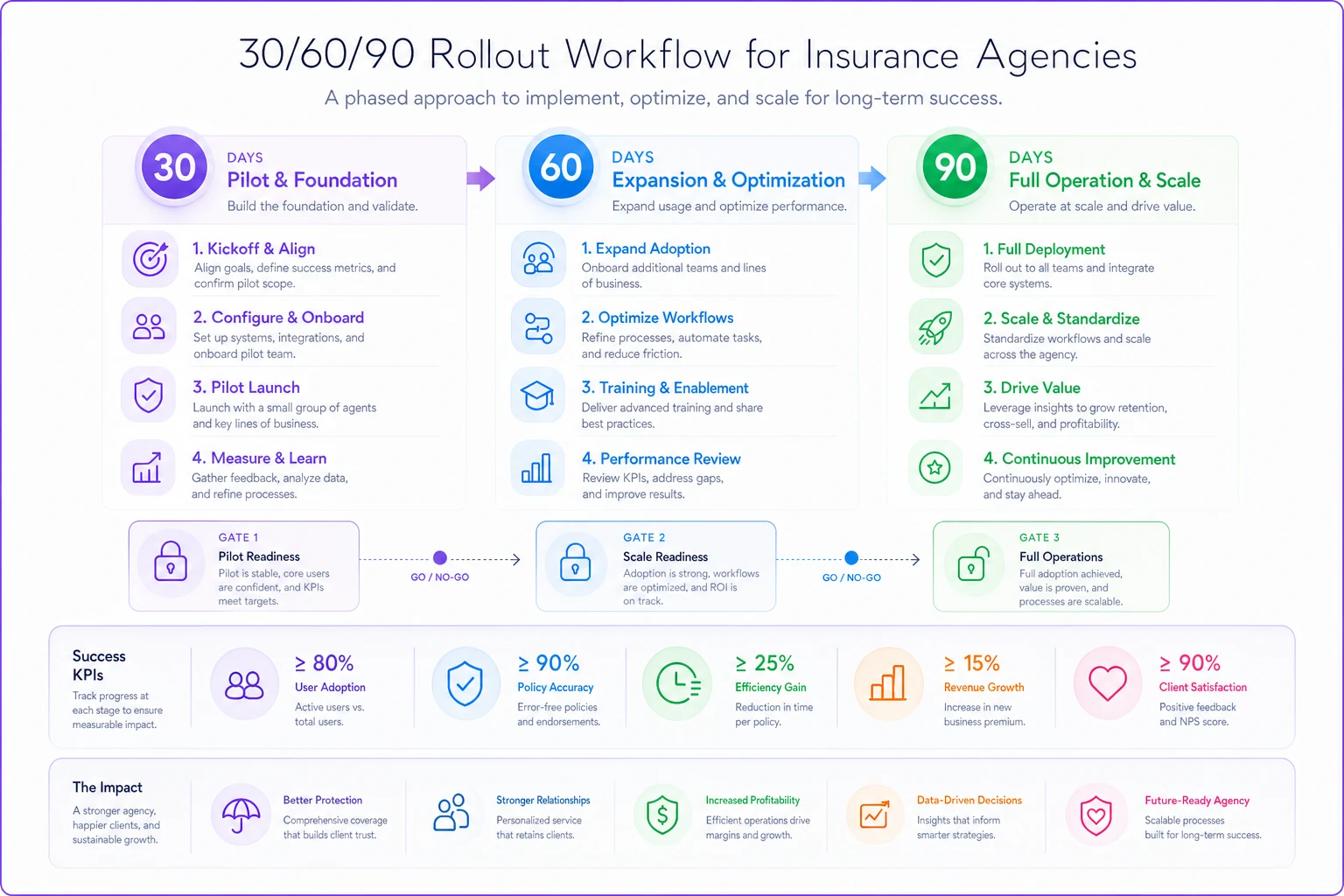
The mistake to avoid at this stage is advancing on time instead of on readiness. "It's day 31, so we expand" is how you push a half-working system onto your whole team. The calendar sets the rhythm; the KPIs set the permission.
A real scenario
A mid-sized commercial lines agency — around 14 staff, two locations — bought a new management platform after years on a patched-together setup. Their first attempt was a hard cutover. Within two weeks, renewal turnaround had roughly doubled, two COIs went out late, and the senior CSR had quietly rebuilt her old tracking spreadsheet because she didn't trust the new queue.
They stopped, backed out, and restarted with a staged approach. This time they piloted on personal lines renewals with three people, ran a one-week parallel period, and set rollback gates around turnaround time and any client-facing delay. They published a weekly metrics recap so the team could see adoption climbing instead of guessing.
By the end of the roughly 90-day staged rollout, double-entry incidents had dropped to near zero, renewal on-time rate had climbed back above where it started, and — maybe most telling — the senior CSR had deleted her spreadsheet on her own. Nobody made her. The system had finally earned it.
The difference between attempt one and attempt two wasn't the software. It was the same software both times. The difference was structure.
When this full playbook makes sense — and when it doesn't
When it makes sense: You're moving a team of roughly eight or more people, you have multiple roles with real handoffs between them, or you've been burned by a sloppy rollout before. The more coordination your operation requires, the more this structure pays for itself.
When it's overkill: A three-person agency switching tools can run a lighter version — you still want rollback rules and a short pilot, but you don't need a formal communication calendar when you all sit in the same room.
Who should NOT attempt a rollout yet: Agencies whose underlying data is a mess. If your policy fields are inconsistent and your records are full of gaps, migrating into a new system just relocates the chaos and makes it look official. Clean the data first, standardize your core fields, then think about moving platforms. A new tool sitting on bad data will fail, and you'll blame the tool.
The bigger point
Technology change in an agency isn't an IT event. It's an operations event. The software is maybe a third of the equation — the rest is how your people, your handoffs, and your renewal cycles absorb the change without dropping anything on the floor.
Agencies that treat rollouts as a project with stages, gates, metrics, and a schedule tend to come out the other side stronger. Agencies that treat them as a purchase followed by an announcement tend to spend months in a broken half-state, paying for a system half the team doesn't use. Same tool, wildly different outcome — and the only variable that changed was whether anyone owned the human side of the switch.
Ready to transform your insurance agency operations?
Join 500+ agencies using Covixly to reduce manual work, improve client service, and grow their book of business.