


Ask five people in an agency to save the same signed application, and you'll get five different filenames. AppSigned.pdf. Johnson App FINAL.pdf. johnsonappv2USE THIS ONE.pdf. scan0043.pdf. Multiply that across a book of 4,000 policies, three producers, two CSRs, and six years of file history, and you've got a document system that only works if the person who created the file is the one looking for it.
That's the real cost of no naming standard. Not messy folders — it's that institutional knowledge lives in people's heads instead of in the file structure, and the second someone goes on vacation or quits, retrieval slows to a crawl. A solid document naming taxonomy for an insurance agency is one of the highest-leverage, lowest-cost systems you can put in place, and almost nobody does it until the pain gets unbearable.
This is a systems piece, not a folder-cleanup tip sheet. The goal is to show how naming, templates, and enforcement rules connect, where the whole thing breaks as you scale, and what a ready-to-adopt standard actually looks like.
Why naming chaos is a structural problem, not a tidiness problem
Most agencies treat document naming like housekeeping — something you'll get to when things slow down. Naming is actually the connective tissue between your management system, your producers, and your compliance obligations. When it's inconsistent, three things quietly break at once.
Retrieval slows down for everyone but the file's author. In real operations this usually shows up during a coverage dispute or an E&O inquiry, when someone needs the signed rejection form from 2021 and the only person who knows where it lives is out that week. The file exists. Nobody can find it fast.
Duplicates multiply. When a CSR can't quickly confirm whether the current dec page is already saved, they re-download and re-save it. Now you have two versions, sometimes with conflicting data, and no clear signal about which one is authoritative. This is the single most common cause of "we sent the client the wrong document" errors.
Audits become expensive. Whether it's a carrier audit, an internal QA sweep, or an acquisition due-diligence request, unstructured documents turn a two-hour task into a two-week project. Buyers discount agencies with disorganized files because they know the cleanup cost is real.
The pattern is pretty consistent: the naming problem stays invisible while the agency is small enough that everyone remembers everything. Then you add a producer, cross the 2,500-policy mark, or bring on staff who weren't there when the files were created — and suddenly retrieval time becomes a measurable drag on every workflow.
The anatomy of a naming taxonomy that actually holds up
A good taxonomy is boring by design. It should be so predictable that anyone can guess the filename without opening the folder. Fixed fields, in a fixed order, with controlled values — not free text.
Eliminate paperwork bottlenecks and missed deadlines.
Covixly helps you track, manage, and close every policy and claim with confidence and speed.
- Unified policy & claims management
- Automated client notifications
- Agent task coordination
No credit card required
[ClientID][PolicyNumber][DocType][EffectiveDate][Status]
A real filename ends up looking like:
C10482HO0093847DEC2024-06-01FINAL.pdf
Every field does a job:
-
ClientID — ties the doc to a client even if the policy number changes at renewal or when they switch carriers
-
PolicyNumber — the carrier's identifier, so cross-referencing is instant
-
DocType — a controlled abbreviation from a fixed list (more on this below)
-
EffectiveDate — in
YYYY-MM-DDformat so files sort chronologically on their own -
Status —
DRAFT,FINAL,SIGNED, orVOID, which kills the "which version is real" problem
Use
YYYY-MM-DDdates to keep files sortable and avoid ambiguity.
The two rules people break most: they use free text where they should use a controlled value, and they format dates as 6/1/24 instead of 2024-06-01. Free text reintroduces the exact chaos you're trying to eliminate. Non-sortable dates mean your files never line up in a usable order, which defeats half the point.
A controlled DocType list
| DocType Code | Document | Common mistake it prevents |
|---|---|---|
APP | Application | Saved as "quote," "form," or "app-thing" |
DEC | Declarations page | Confused with the full policy |
POL | Full policy contract | Mixed up with dec pages |
END | Endorsement | Buried inside a generic "changes" folder |
COI | Certificate of insurance | Saved a dozen different ways per holder |
EPI | Evidence of property insurance | Confused with COIs |
LOR | Rejection / letter of rejection | Impossible to find during E&O disputes |
AUD | Audit document | Scattered across email and drives |
CANC | Cancellation notice | Lost until it's a reinstatement problem |
CORR | Client correspondence | Dumped into "misc" |
The value isn't the codes themselves — it's that there's exactly one code per document type and no room for interpretation. When a CSR sees LOR in a filename, they know immediately it's a rejection form without opening it. That's the entire goal.
Templates: where the taxonomy stops being theoretical
A naming standard on a wiki page nobody reads doesn't change behavior. What changes behavior is templates that come pre-named and pre-structured, so the standard is the path of least resistance instead of extra work.
For each common document type, you want a template that carries three things: a filename skeleton, required internal fields, and a save location that's already mapped. Take a certificate of insurance. The template should auto-populate the filename with the client ID and policy number pulled from the management system, drop in the COI code, and default the status to DRAFT until someone marks it issued. The person creating it fills in the holder details and nothing else about naming.
Here's a quick visualization of that process.
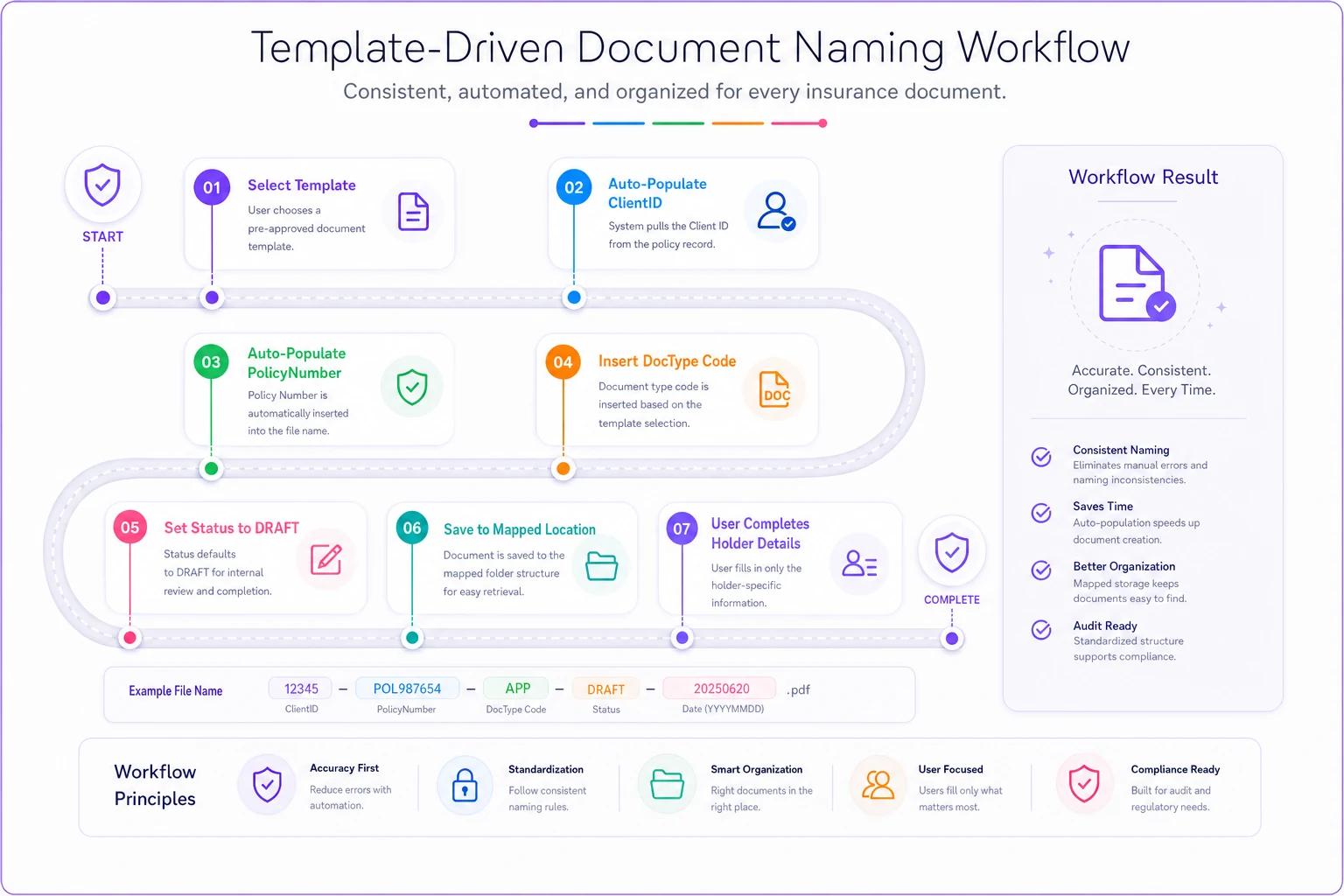
This is where naming discipline ties directly into your broader workflow. If you've already mapped your policy lifecycle with clear roles and handoffs, each stage has a predictable set of documents it produces. New business creates the app, the dec, and the signed forms. Endorsements create the change request and the revised dec. Renewals create the renewal offer and updated dec. Your template library should mirror that lifecycle so the right template surfaces at the right stage — nobody hunting for the correct form or inventing a filename on the fly.
A minimum viable template library covers:
-
New business application package (APP, signed forms, coverage selections)
-
Declarations page (personal and commercial variants)
-
Endorsement request and confirmation
-
Certificate of insurance and evidence of property
-
Cancellation and reinstatement notices
-
Rejection and coverage-declined letters
-
Renewal offer and comparison summary
-
Claim acknowledgment and status correspondence
These map cleanly to the same documents that flow through your client self-service portal. When a client pulls their own COI or ID card, the file they get should follow the exact same naming standard your staff uses internally — so a document requested online and one filed manually are indistinguishable and equally findable later.
Enforcement: tying naming to SLAs so it doesn't decay
Standards decay the moment enforcement stops. You can roll out a beautiful taxonomy, train everyone, and watch compliance drift back to 60% within a quarter unless the standard is tied to something people are already measured on.
The move that actually works is attaching naming compliance to your existing service-level agreements. If a CSR has a 24-hour SLA to process an endorsement, "processed" means the endorsement document is saved with a compliant filename in the correct location — not just that the change was keyed into the system. Naming becomes part of the definition of done, not an afterthought.
A few enforcement mechanisms, roughly in order of how much friction they remove:
-
Bake naming into the template so the correct filename is the default and deviating takes extra effort.
-
Add a QA sampling routine — pull 15–20 random documents a week and check them against the standard. Track the compliance rate as a team metric.
-
Set a duplicate-detection rule that flags when two files share a ClientID and DocType with overlapping effective dates, so re-saves get caught before they multiply.
-
Tie the compliance rate to SLA reporting so a document that's saved wrong counts the same as a task that's late.
-
Run a quarterly cleanup sprint for the backlog, because no standard fixes historical files automatically.
The mistake agencies make is enforcing through nagging emails. Reminders don't scale. What scales is making the compliant path the easy path and building one small automated check that catches the exceptions. This is where AI-assisted document tools earn their keep — flagging near-duplicates, suggesting the correct DocType from a scanned file, catching filenames that don't match the pattern before they get saved. Used that way, the automation isn't replacing judgment; it's removing the tedious checking that humans stop doing consistently after week three.
What breaks at scale — and the sequence it breaks in
Naming problems don't hit all at once. They arrive in a predictable order as the agency grows, and knowing the sequence helps you get ahead of it.
Under ~1,500 policies: Everyone knows where everything is. The founder or a long-tenured CSR is the human index. Naming feels unnecessary, and honestly, it mostly is.
1,500–3,500 policies: New staff join who weren't there for the early files. Retrieval time starts creeping up. Duplicates appear. The first "I can't find the signed app" fire drills happen. This is the ideal window to implement a standard, because the file volume is still manageable enough to clean up.
3,500–7,000 policies and multi-producer: Now different producers have different personal conventions baked in. A merged book or an acquired agency adds a second incompatible system. Compliance and audit requests become genuinely painful. Retrieval time is now a measurable operational cost — if a CSR spends even eight minutes a day hunting for files, across five people that's roughly 150 hours a year evaporating.
7,000+ / multi-branch: Without a standard, you effectively have several document systems pretending to be one. Consolidation projects get quoted in weeks. E&O exposure rises because you can't reliably prove what was sent and when.
The insight most owners miss: the cost of implementing a taxonomy stays roughly flat over time, but the cost of not implementing one compounds. Every month without a standard adds more legacy files to eventually reconcile.
A real scenario
A commercial-lines agency running around 4,200 policies with two producers and three CSRs had a recurring problem: certificates and endorsements were saved under whatever convention each person preferred. When a holder called asking for an updated COI, the CSR often couldn't tell if the current version was already on file, so they'd regenerate it — creating duplicates and, a few times, sending an outdated cert with wrong limits.
They rolled out a fixed taxonomy and a template library over about six weeks, starting with new documents only and running a backlog cleanup in parallel. They tied naming compliance to their existing endorsement SLA and added a weekly QA sample of 20 files.
The change wasn't dramatic on paper, but it was real. Average document retrieval dropped from a few minutes of hunting to under fifteen seconds. Duplicate COIs largely stopped appearing. The QA sample compliance rate went from somewhere around 55% in month one to consistently above 90% by month three. The producers stopped being the only people who could find their own clients' files — which mattered most when one of them was out for two weeks and coverage actually held.
When this is worth it — and when it isn't
When it makes sense: You're past ~1,500 policies, you have staff who didn't create the original files, you've had at least one "can't find the document" incident, or you're preparing for growth, a merger, or a sale. In all of these, the taxonomy pays for itself fast.
When it's premature: You're a solo agent with a small book and a memory that still holds the whole index. Building a formal template library and enforcement routine before you have the volume to justify it is over-engineering. Put in a simple, sane naming convention and revisit when you cross the growth threshold.
Who should not attempt a big-bang rollout: Anyone with a large, messy backlog and no bandwidth. If you try to rename six years of history all at once, you'll stall. Start with new documents from a cutoff date forward, get the standard sticking with current work, and clean up the backlog in scheduled sprints. Trying to boil the ocean is the most common reason these projects die.
Bringing it together
A document naming taxonomy isn't a filing preference — it's operational infrastructure that determines how fast your agency can retrieve files, how reliably it avoids duplicates, and how well it holds up when a person is out or a book changes hands. The taxonomy defines the language, the template library makes that language the default, and enforcement tied to your SLAs keeps it from decaying.
The agencies that get this right treat naming as part of the definition of a completed task, not a chore for a slow afternoon. Start with a fixed field structure, a short controlled DocType list, templates that pre-name themselves, and one weekly QA check. Do that before you cross the volume where retrieval becomes a daily tax — and you'll spend the next few years finding any file in seconds instead of building a bigger haystack.
A document naming taxonomy isn't a filing preference — it's operational infrastructure that determines how fast your agency can retrieve files, how reliably it avoids duplicates, and how well it holds up when a person is out or a book changes hands. The taxonomy defines the language, the template library makes that language the default, and enforcement tied to your SLAs keeps it from decaying.
The agencies that get this right treat naming as part of the definition of a completed task, not a chore for a slow afternoon. Start with a fixed field structure, a short controlled DocType list, templates that pre-name themselves, and one weekly QA check. Do that before you cross the volume where retrieval becomes a daily tax — and you'll spend the next few years finding any file in seconds instead of building a bigger haystack.
Ready to transform your insurance agency operations?
Join 500+ agencies using Covixly to reduce manual work, improve client service, and grow their book of business.