


The certificate of insurance request came in at 4:47 PM on Friday. Again.
Your CSR team groans collectively. Another commercial client needs their COI for a Monday morning contract bid, and they somehow just remembered. The agent who handles this account is already halfway to the lake for the weekend. Someone's going to spend their Friday evening generating documents that the client could've downloaded themselves if you had the right portal setup.
This scenario burns through roughly 11-14 hours of CSR time every week at mid-sized agencies. That's just for COIs and ID cards. Add in dec page requests, billing questions, and basic policy inquiries, and you're looking at 30% of your support team's capacity eaten by document retrieval tasks.
The Hidden Cost of Document Requests
Most agencies underestimate how much manual document distribution actually costs them. Running the numbers on a typical 8-person agency handling personal and commercial lines:
-
Average COI request takes 12 minutes (find policy, generate, email, confirm receipt)
-
ID card requests take 7 minutes
-
Dec page requests take 9 minutes
-
Billing statement requests take 6 minutes
At 140 document requests weekly, you're burning $2,800-3,400 monthly in labor costs on tasks that add zero strategic value to your agency. That's before accounting for the opportunity cost of CSRs not handling renewal reviews or cross-sell conversations.
The knee-jerk reaction is to throw a client self-service portal insurance solution at the problem. But when agencies rush portal deployment without proper guardrails, support calls actually increase for the first 90 days. Clients can't reset passwords, don't understand navigation, upload wrong documents, or worse—access information they shouldn't see.
Why Most Insurance Portals Fail at Self-Service
Portal failures follow predictable patterns. The technology works fine, but the implementation ignores fundamental user experience realities.
Eliminate paperwork bottlenecks and missed deadlines.
Covixly helps you track, manage, and close every policy and claim with confidence and speed.
- Unified policy & claims management
- Automated client notifications
- Agent task coordination
No credit card required
Authentication Complexity Kills Adoption
Insurance clients aren't logging into your portal daily like they check Gmail. They access it maybe 3-4 times annually. By the time they need that COI, they've forgotten their password, can't remember which email they used, and the security questions reference their first pet from 1987.
One agency rolled out a portal requiring two-factor authentication plus security questions. Adoption rate after six months? 11%. The support team spent more time helping clients log in than they saved on document requests.
Permission Structures Create Confusion
Commercial accounts get messy fast. The business owner wants full access. The office manager needs billing statements but shouldn't see claim details. The fleet manager needs vehicle ID cards but not property coverage information. The CFO wants everything exported to Excel.
Without granular permission controls, you either give everyone too much access (compliance nightmare) or restrict access so much that nobody can self-serve effectively.
Mobile Experience Determines Success
68% of portal access happens on mobile devices, usually in urgent situations. The contractor sitting in their truck needs that COI uploaded to a general contractor's compliance system. The parent at the DMV needs their teenager's ID card. The business owner at a conference needs coverage verification.
Desktop-first portal designs guarantee frustrated users and support calls.
Building Approval Flows That Actually Work
The scariest part of self-service isn't what clients can see—it's what they can change. Smart approval workflows protect both the agency and client while maintaining usability.
Critical Changes Need Human Review
Some actions should never be fully automated:
-
Coverage limit increases
-
Adding new drivers or vehicles
-
Changing beneficiaries
-
Modifying business classifications
-
Adjusting deductibles downward
These changes trigger immediate agent notification with a 24-hour review window. The portal accepts the request, timestamps it, but doesn't process until approved. Clear messaging prevents client confusion about timing.
Low-Risk Changes Can Auto-Approve
Other modifications can process automatically with proper safeguards:
-
Address updates (with USPS validation)
-
Phone number changes
-
Email updates (with verification)
-
Payment method updates
-
Document delivery preferences
The key is audit trails. Every change logs who, what, when, and from which IP address. Suspicious patterns trigger manual review.
Graduated Permissions Based on Account History
New clients get restricted access for the first 90 days. They can view documents but can't make changes. This reduces fraud risk and gives your team time to establish the relationship.
Long-term clients with clean payment history get expanded self-service options. They've proven reliability and understand your processes. These accounts generate the least support burden when given appropriate autonomy.
The UX Details That Cut Support Calls by 70%
Small design decisions dramatically impact support volume. These aren't revolutionary concepts, but agencies consistently overlook them.
Password Reset Without Human Help
-
SMS verification to registered phone numbers
-
Email reset with time-limited tokens
-
Security questions with forgiving answer matching
-
Option to reset via policy number + ZIP code
Make SMS verification the default password-reset option for mobile-heavy user bases.
Agencies using all four methods see 85% of users successfully reset without support intervention.
Document Generation With Smart Defaults
-
Certificate holder pulls from recent history
-
Coverage details auto-fill from active policies
-
Additional insured suggestions based on industry
-
Waiver of subrogation checkboxes match typical requirements
The client should only need to confirm or modify, never enter from scratch. This reduces errors and support calls about "incorrect" certificates.
Visual Policy Timelines
-
Payment due dates
-
Renewal deadlines
-
Pending endorsement effective dates
-
Claim filing deadlines
Visual learners (about 65% of people) immediately grasp what text descriptions obscure.
Setting Realistic Support Reduction Targets
Agencies love claiming their portal will "eliminate 90% of support calls." That's fantasy. Here are realistic metrics based on actual agency implementations:
| Request Type | Pre-Portal Weekly Volume | Realistic Reduction | Post-Portal Weekly Volume |
|---|---|---|---|
| ID Cards | 45 calls | 75% | 11 calls |
| COIs | 38 calls | 70% | 11 calls |
| Dec Pages | 22 calls | 65% | 8 calls |
| Billing Questions | 31 calls | 40% | 19 calls |
| Coverage Verification | 19 calls | 80% | 4 calls |
| Payment Updates | 24 calls | 60% | 10 calls |
Total realistic reduction: 62% of document-related support calls.
That's still massive. For our 8-person agency example, that's 16-20 hours weekly returned to productive work. But expecting more sets you up for disappointment and probably means you're not accounting for portal-generated support needs.
The Portal Support You'll Still Need to Provide
Even the best self-service portal generates its own support requirements. Plan for these realities:
Onboarding Support Spike
The first 30 days after launching to each client segment will increase support calls by 20-30%. Clients need hand-holding through initial registration, navigation training, and feature discovery. This is investment, not waste. Proper onboarding drives long-term adoption.
Smart agencies batch-launch to client segments weekly, not all at once. This prevents overwhelming support teams and allows process refinement between groups.
Ongoing Password and Access Issues
No matter how bulletproof your reset process, 10-15% of users will still need help. Often these are older clients or those with limited tech comfort. Build this into your support capacity planning.
Consider dedicated "portal office hours" where a CSR specifically handles access issues via screen share. Concentrated support is more efficient than scattered interruptions.
Feature Education Requirements
Clients won't discover features naturally. That COI generation tool saves tons of time, but only if clients know it exists and trust it works correctly.
Quarterly feature highlights via email, login page notifications about underused tools, and proactive agent conversations during renewal reviews drive feature adoption. Without ongoing education, portal usage plateaus around 30% of potential.
Integration Requirements Often Overlooked
Your client self-service portal insurance system doesn't exist in isolation. Poor integration planning creates data inconsistencies that erode client trust and generate support calls.
Real-Time Sync with Core Systems
Nothing destroys portal credibility faster than outdated information. If a client pays their premium through the portal but it doesn't reflect in your management system for 24 hours, expect angry calls.
Minimum sync requirements:
-
Payment posting within 10 minutes
-
Document updates within 1 hour
-
Coverage changes within 4 hours
-
Contact info updates immediate
Batch overnight syncing belongs in 2010. Modern clients expect instant updates.
Carrier Data Flow Complexity
Personal lines carriers typically provide better portal data feeds than commercial carriers. Admitted carriers generally outperform surplus lines markets. Plan your portal rollout accordingly.
Starting with personal auto and home clients lets you refine processes with cleaner data flows. Commercial lines and excess coverage can follow once the foundation is solid.
Building Your Implementation Roadmap
Successful portal deployment follows predictable phases. Rushing any phase typically doubles your total implementation time through rework.
Phase 1: Document Retrieval Only (Months 1-2)
-
Start simple. Give clients read-only access to
-
Current ID cards
-
Active dec pages
-
Recent invoices
-
Claim summaries
This proves the authentication system works, builds user familiarity, and generates quick wins without risk.
Phase 2: Simple Self-Service (Months 3-4)
-
Add low-risk self-service features
-
COI generation with templates
-
Payment method updates
-
Contact information changes
-
Document delivery preferences
Monitor support tickets carefully. Each new feature should reduce specific call types without creating new problems.
Phase 3: Advanced Features (Months 5-6)
-
Once adoption exceeds 50%, introduce complex functionality
-
Coverage change requests
-
Claim filing
-
Renewal modifications
-
Multi-policy account management
By this point, clients trust the portal and your team understands support patterns.
A simple phased rollout workflow looks like this.
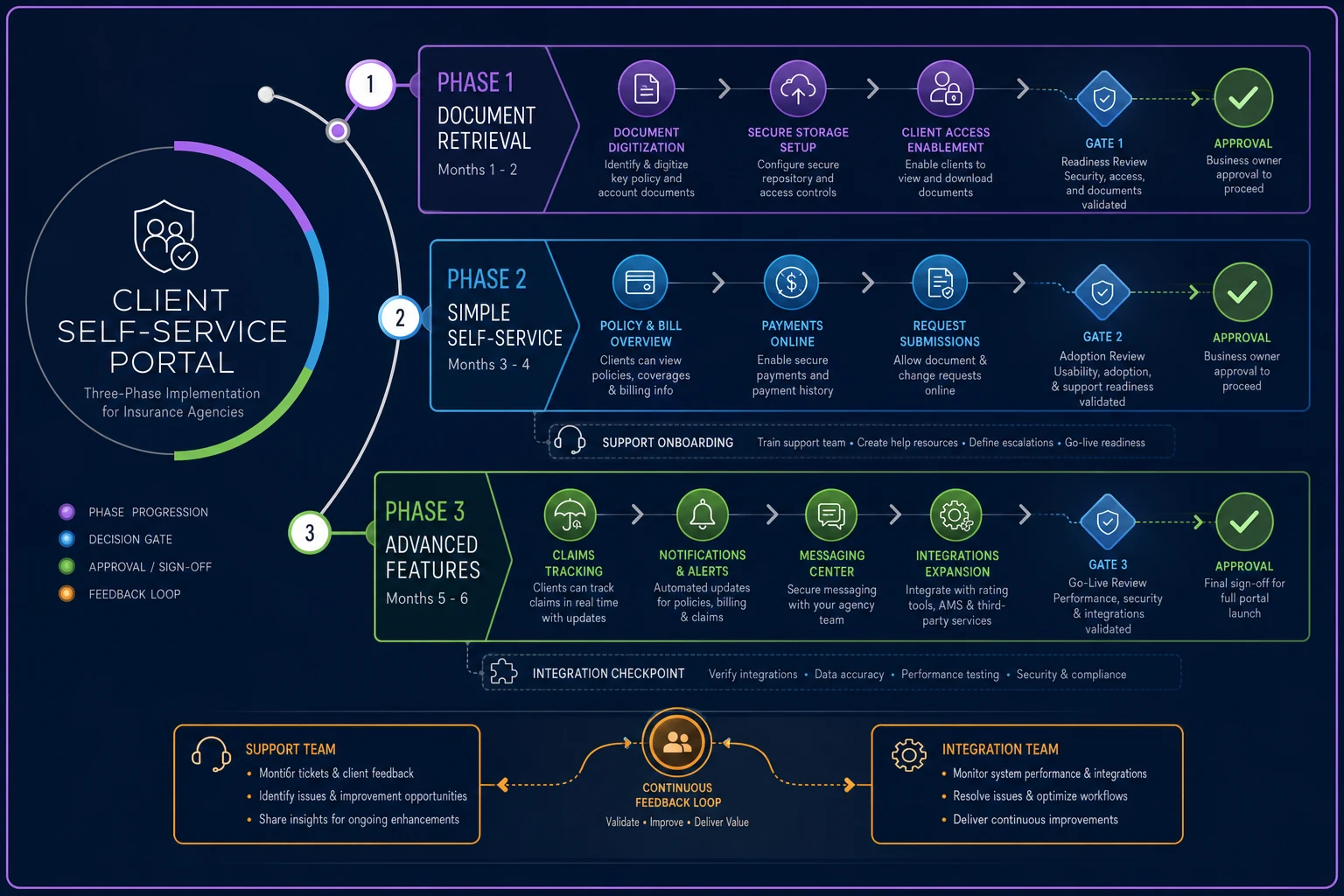
Use this flow to guide staged rollouts and gate releases.
Measuring What Actually Matters
Agencies track portal logins obsessively while ignoring metrics that matter. Who cares if clients log in daily if they still call for every COI?
Task Completion Rate: Percentage of sessions where users accomplish their intended task without support contact. Target: 75%+
Document Self-Service Rate: Percentage of total document requests handled through portal vs. human support. Target: 65%+
First Contact Resolution: When portal users do contact support, percentage resolved without escalation. Target: 85%+
Time to Value: Average days from account creation to first successful self-service transaction. Target: <7 days
Support Deflection Cost: Monthly support hours saved multiplied by loaded hourly rate. Target: 3x portal licensing cost
These metrics directly connect portal performance to operational efficiency.
When Not to Build a Portal
Some agencies shouldn't invest in self-service portals. If you recognize these characteristics, spend resources elsewhere:
Your Book Is Too Small: Under 1,000 policies, the economics rarely work. Fixed portal costs spread across too few users makes per-client costs prohibitive.
High-Touch Is Your Differentiator: Some agencies compete on white-glove service. If clients pay premium prices for personalized attention, don't push them toward self-service.
Your Team Lacks Technical Depth: Portals need ongoing maintenance, feature updates, and integration monitoring. Without internal technical capability or budget for external support, portals become stagnant and problematic.
The Operational Reality Check
Success depends more on operational discipline than technology selection.
The best portal software can't overcome poor implementation planning. Meanwhile, agencies with clear processes and realistic expectations succeed even with mid-tier portal solutions.
Before investing in any client self-service portal insurance platform, document your current support workflows. Track actual request volumes by type. Measure time spent on routine tasks. Calculate the real cost of manual document distribution.
Then build your portal strategy around eliminating specific operational friction points, not vague promises of "digital transformation."
The agencies seeing 60-70% support reductions didn't get lucky. They identified exactly which manual processes burned the most time, designed portal workflows to address those specific issues, and relentlessly measured results against clear targets.
Your CSRs shouldn't spend Friday evenings generating COIs. Building the portal infrastructure to prevent that requires more than software—it demands thoughtful implementation, realistic expectations, and commitment to ongoing refinement.
The agencies getting this right are freeing up 20+ hours weekly for revenue-generating activities. They're turning document retrieval from a cost center into a competitive advantage. Most importantly, they're giving clients the self-service experience they expect while maintaining the protection and compliance standards insurance requires.
Ready to transform your insurance agency operations?
Join 500+ agencies using Covixly to reduce manual work, improve client service, and grow their book of business.