


Most personal-lines onboarding delays don't come from the client. They come from the dead space between when a policy is bound and when the account is actually clean, documented, and ready to service. The client already said yes. They already paid. And yet the file sits for two, three, sometimes five days while someone chases a signature, retypes VIN numbers, or waits for a mortgagee clause to come back.
Almost none of that time is real work. It's waiting, re-entering, and hunting for missing pieces. This post is a step-by-step onboarding checklist built specifically for personal lines — auto, home, renters, umbrella — with concrete automation triggers, sample templates, and SLA targets you can lift straight into your workflow.
Not covering strategy or staffing here. Just the mechanical path from "bound" to "fully onboarded," and where the hours actually hide.
Where the days actually disappear
Before the checklist, it helps to know which steps actually eat the clock. In practice, the delay almost always lands in one of these five spots:
-
Waiting on the signed application or e-sign packet. The producer sends it, then it sits in the client's inbox for 36 hours.
-
Manual re-keying from the dec page into the AMS. Someone reads a PDF and types coverage limits into fields by hand.
-
Missing supporting docs — prior carrier dec, driver's license, VIN, mortgagee info, roof age.
-
Mortgagee/lienholder verification on new home purchases, where the closing date and the effective date fight each other.
-
The welcome/handoff step never happening, so the client calls three days later asking "did my policy go through?"
A typical example: a $1,450 annual auto-plus-home bundle gets bound on a Tuesday afternoon. The signed app doesn't come back until Thursday. The CSR re-keys the dec pages Friday morning, notices the umbrella needs the auto BI limits confirmed, emails back and forth, and the file isn't clean until the following Monday. Six calendar days on a policy that took twenty minutes to quote.
Nothing went wrong. That's the point. Even a smooth file drifts when every handoff waits on a human to notice it.
The onboarding checklist, step by step
Below is the sequence for a standard personal-lines account. Each step has a trigger (what starts it), an action, and an SLA target (how fast it should clear). The triggers are where automation earns its keep — most of them can fire the moment a prior step completes, instead of waiting for someone to check.
Eliminate paperwork bottlenecks and missed deadlines.
Covixly helps you track, manage, and close every policy and claim with confidence and speed.
- Unified policy & claims management
- Automated client notifications
- Agent task coordination
No credit card required
1. Bind confirmation → intake record created
Trigger: Policy marked "bound" in the AMS or carrier portal.
Action: Create the onboarding record, auto-populate client name, policy number, effective date, and premium. Assign an owner.
SLA: Immediate (same hour).
This is the step people skip, and it causes half the downstream mess. If there's no single record that says "this account is mid-onboarding," things fall through. The moment a bind happens, an intake record should exist — even if it's just a task in your management system.
2. E-sign packet sent → signed docs returned
Trigger: Intake record created.
Action: Auto-generate and send the e-signature packet (application, disclosures, EFT authorization).
SLA: Packet sent within 1 hour of bind; signed return targeted within 24 hours.
The biggest lever here is e-signature with automated reminders. When the packet sends automatically on bind and nudges the client at 4 hours and 20 hours, signed-return time drops from days to under a day for most clients. A packet that requires a producer to manually assemble and send is a packet that sits until end of day.
3. Dec page received → coverage data parsed into AMS
Trigger: Carrier dec page or confirmation received (usually by email).
Action: Parse coverage limits, deductibles, VINs, dwelling amount, and effective dates directly into policy fields.
SLA: 2 business hours from receipt.
This is the re-keying step, and it's the one worth automating hardest. Email parsing that reads the carrier confirmation and maps fields into the management system removes the slowest, most error-prone manual task in the whole flow. If you go this route, be strict about field-level accuracy — parsers are great until a mismatched deductible slips through, and personal auto has a lot of numeric fields that look similar.
4. Missing-doc scan → client outreach
Trigger: Intake record checked against a required-docs list for the product type.
Action: Flag any missing item (prior dec, DL, VIN, mortgagee clause, roof/HVAC age for home) and send one consolidated request.
SLA: Same day as bind.
The mistake agencies make constantly: requesting missing documents one at a time as they notice them. The client gets three separate emails over two days. Consolidate into one request, sent same-day, with a checklist the client can respond to in a single reply. One email that asks for everything beats three that each ask for one thing.
5. Mortgagee / lienholder verification (home only)
Trigger: Home policy with a lender flagged.
Action: Confirm mortgagee clause matches lender requirements; send updated dec to lender/closing agent.
SLA: 1 business day, or by closing date if sooner.
On purchase transactions this is time-sensitive and easy to blow. The effective date has to line up with closing, and the lender needs the dec before funding. Tie this step to the closing date, not to whenever someone gets around to it.
6. Data QA → account marked clean
Trigger: Steps 1–5 complete.
Action: Quick review — coverages match the quote, effective dates align, no open document requests.
SLA: 1 business hour.
This is a five-minute check, not a full re-audit. You're confirming the parsed data matches the dec and nothing's still open.
7. Welcome + service handoff
Trigger: Account marked clean.
Action: Send welcome message with portal access, ID cards, service contact, and renewal expectations. Hand off to the servicing CSR.
SLA: Within 2 business hours of QA passing.
The welcome step signals to the client that they're done and covered. Skip it and you get the "did my policy go through?" call — which is pure rework.
A quick visual of the onboarding workflow:
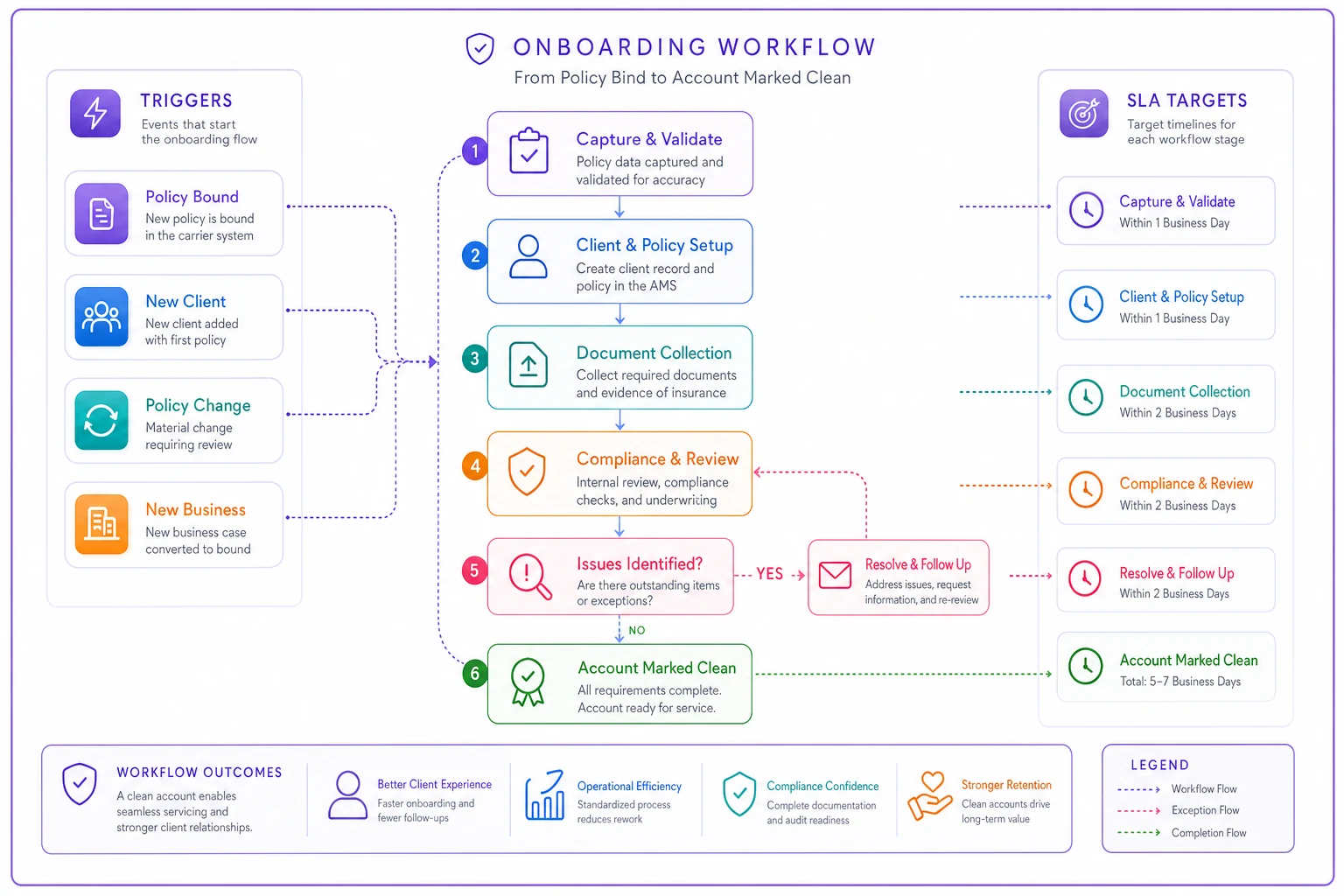
The flow shows triggers, actions, and SLA targets.
A sample SLA table you can lift
The whole sequence condensed. Adjust the targets to your team's reality, but the relative pacing matters more than the exact numbers.
| Step | Trigger | Owner | SLA target |
|---|---|---|---|
| Intake record created | Policy bound | Producer/System | Same hour |
| E-sign packet sent | Intake created | System | Within 1 hour |
| Signed docs returned | Packet sent | Client (nudged) | Within 24 hours |
| Dec data into AMS | Dec received | CSR/System | 2 business hours |
| Missing-doc request | Doc scan | CSR | Same day |
| Mortgagee verification | Lender flagged | CSR | 1 business day / by closing |
| Data QA | Steps 1–5 done | CSR/Lead | 1 business hour |
| Welcome + handoff | QA passed | CSR | 2 business hours |
Against these targets, a clean personal-lines file that used to take four to six days can close inside a single business day — most of the remaining wait being the client's own signature time.
Sample templates worth standardizing
You don't need fancy copy. You need consistency, so nothing gets forgotten. A few templates carry most of the weight:
Consolidated missing-doc request (Step 4):
> Hi [First name] — welcome aboard, and thanks for choosing us. To finish setting up your policy, we just need a few things:
-
A copy of your driver's license
-
Your prior insurance declarations page (if switching carriers)
-
[Home only] Roof age and any recent updates (HVAC, electrical, plumbing)
-
[If financed] Lender name and loan number for the mortgagee clause
> Reply to this email with what you have and we'll take care of the rest. Everything should be finalized within one business day of receiving these.
Welcome + handoff (Step 7):
> Hi [First name] — your [policy type] is all set, effective [date]. Here's what you need:
-
ID cards / dec page attached
-
Portal login
[link]
-
Your service contact
[name, direct line, email]
-
Your renewal date
[date] — we'll reach out well ahead of it
> Nothing else needed from you right now. Questions any time.
Templating isn't just about speed — it's that the same information gets captured every time, which is what makes the next touchpoint (endorsements, renewals, claims) go smoothly.
The automation triggers that matter most
If you can only automate three things in this flow, make them these:
-
E-sign packet auto-send on bind. This alone removes the single longest delay for most files.
-
Email parsing of carrier dec pages into policy fields. This kills the re-keying step and the transcription errors that come with it.
-
Automatic missing-doc detection against a product checklist. So the request goes out same-day instead of whenever someone eyeballs the file.
Everything else — reminders, handoff notifications, QA prompts — can trigger off those three. This is where an AI-assisted operational platform quietly pays for itself: not by doing anything flashy, but by making sure the next step fires the moment the prior one finishes, instead of waiting on a person to notice and act. The value isn't "AI" as a headline. It's that no file sits idle because someone forgot to advance it.
Build the QA gate (Step 6) so parsed data is human-checked before it reaches clients.
A word of caution on parsing: personal auto has a lot of near-identical numeric fields, and a mis-mapped deductible or BI limit is worse than a slow file. Build a QA gate (Step 6) and don't let parsed data flow straight to the client without a human confirming the coverages match the quote.
When this level of structure makes sense — and when it doesn't
This checklist earns its keep once you're onboarding more than a handful of personal-lines accounts a week, or when onboarding is spread across multiple people who each do it slightly differently. Standardization matters most when volume or headcount creates variation.
When it's overkill: a one-person shop writing three or four policies a month probably has the whole flow in their head already. Formalizing it into triggers and SLAs adds overhead they don't need yet. Keep a simple checklist, skip the automation layer.
Who should hold off on automation: if your data is messy going in — inconsistent field naming, carriers you haven't mapped, no clean required-docs list per product — automate the sequence and reminders first, and hold off on parsing until your inputs are standardized. Automating a messy process just produces mistakes faster.
Real scenario
A two-location independent agency writing mostly personal auto and home was averaging four to five days from bind to clean file, with two CSRs handling onboarding between service calls. The bottleneck was exactly where you'd expect: signed apps sat in inboxes, and dec pages got re-keyed whenever the CSR had a gap between phone calls.
They changed three things — auto-sent e-sign packets on bind with reminders, set up parsing on their two primary carriers' dec emails, and switched to a single consolidated doc request. Signed-app return time dropped to under a day for most clients. Re-keying basically disappeared for those two carriers. Clean-file time landed around one business day for standard accounts, and the "did my policy go through?" calls dropped off noticeably because the welcome message now went out automatically.
Nothing about the work got harder. The team just stopped waiting on each other to notice the next step.
The takeaway
Personal-lines onboarding is rarely slow because the work is hard. It's slow because handoffs wait on humans to advance them, and because the same three steps — signatures, dec re-keying, missing docs — quietly stack delays on every file. Nail those three with clear triggers and tight SLA targets, and most standard accounts move from days to hours without anyone working faster. They just stop working later.
Ready to transform your insurance agency operations?
Join 500+ agencies using Covixly to reduce manual work, improve client service, and grow their book of business.