


Most agencies don't botch a paperless migration because they picked the wrong scanner. They botch it because they scan everything, dump it into a shared drive named "SCANNED FILES FINAL," and discover eight months later that nobody can find the 2019 endorsement that proves coverage was declined.
The scanning is the easy part. The hard part is deciding what to scan first, what to name it, and how to know it was done right before you shred the original. That's the whole game. This playbook walks through a phased migration that starts with your highest-risk documents, a naming taxonomy that survives staff turnover, scan specs that hold up under audit, and QA checkpoints that catch problems while you can still fix them.
Start with the files that can end your agency, not the ones cluttering the office
The instinct on day one is to grab the oldest, dustiest boxes and start feeding pages. Wrong order. Old dead files are low-value and low-risk. If a 2011 personal auto policy that's been cancelled for a decade gets scanned poorly, nobody cares.
The files that matter are tied to active E&O exposure and active revenue. Phase your migration by value and risk, not by chronology or by what's physically closest to the scanner.
Here's the priority order that actually protects you:
| Phase | Document category | Why it's first | Rough volume for a 3–5 person agency |
|---|---|---|---|
| 1 | Active commercial policies + signed applications, declinations, coverage rejections | Highest E&O exposure, referenced constantly | 400–900 files |
| 2 | Active personal lines policies + signed forms (UM/UIM rejections especially) | High volume, frequent service touches | 1,500–3,000 files |
| 3 | Open claims documentation | Actively in use, legal sensitivity | 50–200 files |
| 4 | Renewal-in-progress files (next 90 days) | Time-sensitive, needed daily | 200–500 files |
| 5 | Recently expired/cancelled (last 24 months) | Occasional reference, moderate risk | Varies widely |
| 6 | Dead files older than retention floor | Low value, scan or purge per retention rules | The big dusty boxes |
Signed UM/UIM rejection forms deserve a specific callout. That single document is the most-requested file when an auto claim goes sideways and the client swears they never declined coverage. If your Phase 1 and 2 scanning misses those, you've digitized everything except the pages that matter most in a dispute.
The naming taxonomy is the thing nobody plans and everybody regrets
You can have perfect scans and still have a useless archive. What separates a searchable digital file room from a digital junk drawer is a naming convention rigid enough that any staff member names a file the exact same way.
Eliminate paperwork bottlenecks and missed deadlines.
Covixly helps you track, manage, and close every policy and claim with confidence and speed.
- Unified policy & claims management
- Automated client notifications
- Agent task coordination
No credit card required
The failure pattern is predictable: three CSRs scanning at once, one names files "SmithJohnauto," another does "John Smith Auto Policy," a third does "smithj_2024.pdf." Six months later you're searching for a Smith file and getting nothing because you searched "Smith, John" and the file is "JohnSmith."
A naming taxonomy that holds up needs to be consistent, sortable, and machine-readable. Here's a structure that works:
``
[LastnameFirstname][LOB][DocType][CarrierAbbrev][EffectiveDate YYYYMMDD]
``
Real examples:
-
MartinezElenaCommGLApplicationHartford20240301.pdf -
PatelRajPersAutoUMRejectionProgressive20230615.pdf -
NguyenTomHomeDecPageTravelers20241101.pdf
A few rules that prevent the most common naming disasters:
-
Date format is always YYYYMMDD. People fight this one and it's non-negotiable. It's the only format that sorts chronologically when files sort alphabetically. "3-1-24" sorts nowhere useful.
-
No spaces, no commas, no slashes. Slashes break file paths, commas break exports, spaces break older systems. Use underscores or camelCase.
-
Line of business abbreviations are on a fixed list. Publish it.
PersAuto,CommAuto,Home,CommGL,WC,Umbrella,BOP. If it's not on the list, it doesn't get used. -
Document type is on a fixed list too.
Application,DecPage,Endorsement,UMRejection,Cancellation,Correspondence,Claim,SignedForm.
The single most valuable habit: keep the taxonomy on a laminated one-pager taped next to every scanning station. When someone new starts, they don't invent a convention — they copy the sheet.
Scan specs that survive an audit
A scan that looks readable on a monitor can still fail you when it counts. For insurance records, two things matter: legibility under magnification and text searchability.
Baseline specs that hold up:
-
Resolution
300 DPI minimum
for standard documents. Go to 400 DPI for anything with small print, faded fax pages, or handwritten signatures you might need to defend later. -
Black-and-white for text documents, color only when it carries meaning. Highlighting, colored stamps, blue-ink signatures that need to be distinguished from a photocopy — those justify color. A plain policy form doesn't, and color quadruples your file size for no real benefit.
-
PDF/A format for anything you're keeping long-term. Regular PDF is fine day to day; PDF/A is the archival standard that stays openable in ten years.
-
OCR applied to every document. This is the step people skip. A scanned image is a picture — you can't search inside it. Running OCR turns it into searchable text, which is the entire point of going digital.
-
Duplex scanning on by default. The number of "missing" endorsements that were actually printed on the back of a page nobody flipped is higher than you'd think.
One quiet but expensive mistake: scanning at low resolution to save storage space. Storage is cheap now. Rescanning a box you already shredded is impossible. Err toward higher quality on Phase 1 and 2 files specifically.
QA checkpoints — because errors become permanent when you shred
Nothing gets shredded until it passes QA. The scan-then-shred temptation is strong when the office is cramped, but a corrupt file or a missing page discovered after the paper is gone has no fix.
Build QA in three layers so problems get caught where they're cheapest to correct.
Checkpoint 1 — At the scanning station (per file):
-
Page count matches the physical file
-
No blank pages, no double-feeds, no cut-off edges
-
File opens and is readable
-
Named per taxonomy
Checkpoint 2 — Daily batch review (spot-check):
-
Pull roughly 10% of the day's scans at random
-
Verify OCR actually worked (search for a word you can see on the page)
-
Confirm files landed in the right folder
-
Check that no naming duplicates were created
Checkpoint 3 — Pre-shred sign-off (per box):
-
Every file in the box confirmed present in the digital archive
-
A second person verifies — never the same person who scanned
-
Signed/dated log entry before the box goes to shredding
That second-person rule on the pre-shred checkpoint matters more than any other single control. The person who scanned a batch is the worst person to catch their own miss — they already believe it's done.
Where AI-assisted tools genuinely earn their place
You can run this entire migration with a decent scanner, a naming sheet, and disciplined QA. Plenty of agencies do. But there are two spots where AI-enhanced document tools save real time without adding risk.
The first is auto-classification and naming. Modern operational platforms with AI-assisted document handling can read a scanned page, recognize it's a dec page from Travelers effective a certain date, and suggest the file name per your taxonomy. On a 3,000-file personal lines phase, cutting even 30–40 seconds of manual naming per file adds up to days of recovered labor — and it removes the human inconsistency that breaks searchability.
The second is exception flagging during QA. Instead of someone eyeballing whether OCR worked on every page, the system flags files where the text layer is unreadable or a page looks blank, so your reviewer only looks at the flagged ones. That's the difference between spot-checking 10% and confidently covering the whole batch.
A simple workflow diagram of AI-assisted classification and QA:
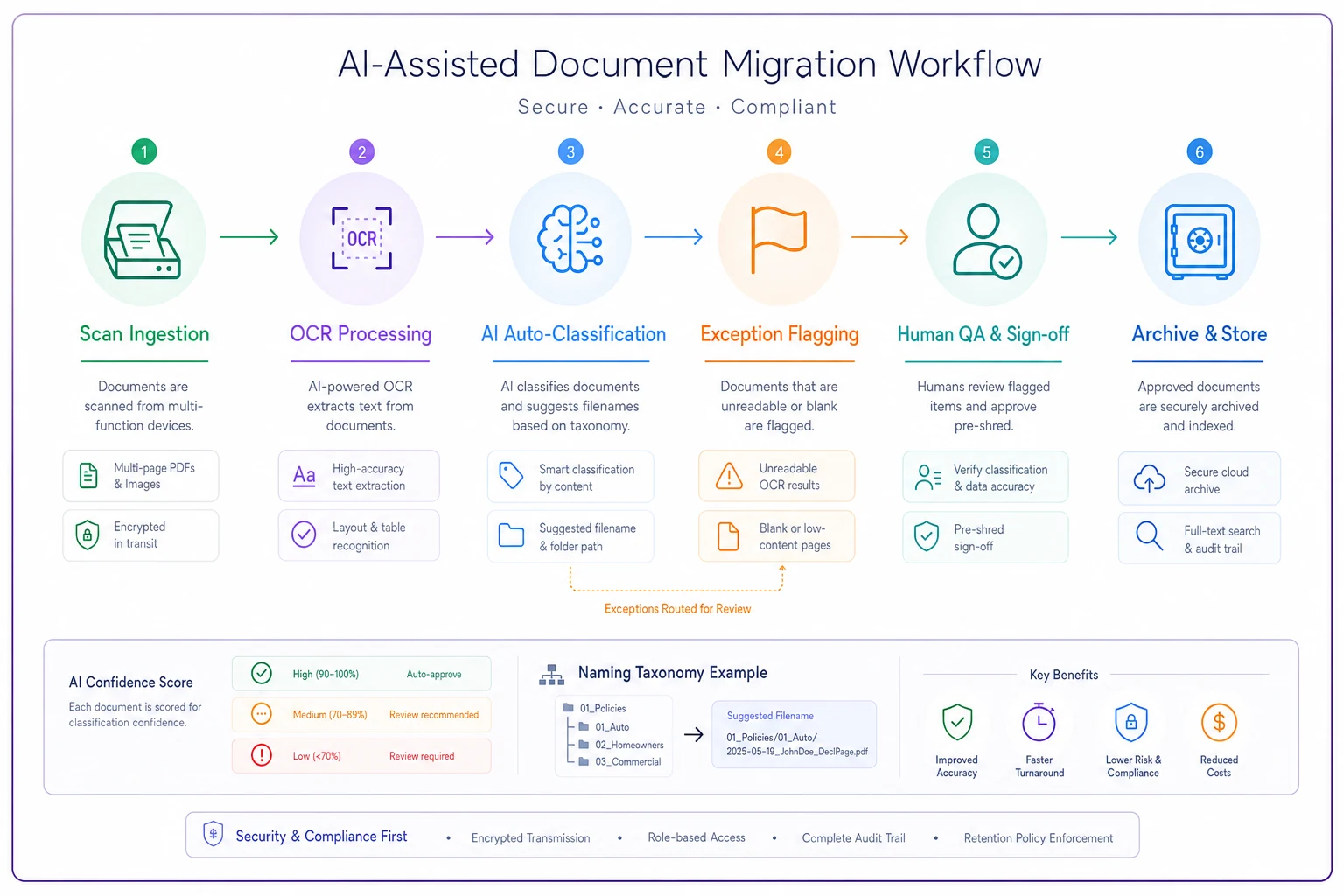
Worth keeping in mind: these tools suggest, they don't get final say. Your pre-shred human sign-off still stands. AI classification is great at handling the routine 90% fast so your people can focus attention on the 10% that are genuinely weird or unclear.
A real scenario: a five-person agency, roughly 4,200 files
A small commercial-heavy agency — two producers, three CSRs — had about 4,200 active and recent files spread across cabinets and a few dozen banker's boxes. They'd tried a paperless push before and abandoned it after everyone named files differently and the shared drive became unsearchable.
The reset ran on the phased plan. Phase 1 (commercial actives, applications, declinations) came to just over 700 files and took about three weeks part-time. During Checkpoint 1, they caught two missing signed applications that had to be re-obtained from carriers before the originals could be pulled. That's exactly the kind of gap you want surfacing before a claim, not during one.
Over roughly four months they worked through Phases 1 through 4. Retrieval time for an active file dropped from "someone walks to the cabinet" — a few minutes plus the interruption — to a few seconds of search. The number that surprised them most: during Phase 5 review they found around 90 files duplicated across two cabinets, meaning staff had occasionally been servicing off the wrong, older copy. Consolidating those removed a source of errors nobody had known existed.
They still haven't scanned the oldest dead boxes. That's fine. Those are Phase 6 and the lowest-value files in the building.
When this makes sense, and when to slow down
Do this now if:
-
you're referencing physical files daily
-
you have active E&O exposure sitting in cabinets
-
or you're running out of space and tempted to purge without a plan
Slow down if:
-
you don't yet have a naming taxonomy agreed on and printed. Starting to scan before the naming standard is locked is the single most common way these projects create a mess worse than paper. Scanning fast into a bad structure just gives you a large, unsearchable pile faster.
Who should not run this as a big-bang project:
-
understaffed agencies mid-renewal-season. Migration competes for the exact same CSR hours as servicing. Run it in phases during slower stretches, and never let scanning volume pull people off time-sensitive renewal or claims work.
Run it in phases during slower stretches, and never let scanning volume pull people off time-sensitive renewal or claims work.
The one thing to get right before anything else
Lock the naming taxonomy and the pre-shred QA sign-off before you scan the first page. Everything else — resolution, format, phasing — is recoverable or adjustable. Inconsistent naming and premature shredding are the two mistakes that turn a paperless migration from an upgrade into a liability you can't undo.
Scan the files that can hurt you first, name them so anyone can find them, verify before you destroy anything, and let the dusty boxes wait. That order is what separates an agency that went digital from an agency that just moved its mess into a folder.
Scan the files that can hurt you first, name them so anyone can find them, verify before you destroy anything, and let the dusty boxes wait. That order is what separates an agency that went digital from an agency that just moved its mess into a folder.
Ready to transform your insurance agency operations?
Join 500+ agencies using Covixly to reduce manual work, improve client service, and grow their book of business.