


Running compliance checks on high-risk commercial lines feels like playing whack-a-mole with a blindfold on. You automate one rule, two edge cases pop up. Handle those, and suddenly your trucking client gets flagged for missing marine coverage they don't even need.
The pattern that keeps showing up: agencies try to automate compliance checks on commercial insurance workflows and end up with more manual reviews than before. Not because the automation fails exactly—because they built it backwards. They started with perfect-world scenarios instead of the messy reality of how these accounts actually work.
The worst part is most agencies find out during audits or claims. By then you're explaining to an E&O carrier why your automated system approved a contractor policy with expired certificates.
Why standard compliance automation chokes on complex commercial
Most compliance platforms work fine for personal auto and homeowners. Clear rules, predictable patterns, standard forms. Then you throw in a mixed-use property with a restaurant, apartments, and a machine shop in the basement—and things get weird fast.
The core problem is that commercial policies stack exceptions on exceptions. A standard GL policy might trigger 15 compliance checks. Add liquor liability and you're suddenly running 25 different validations. Toss in hired-and-non-owned auto coverage and now you're tracking driver records for employees who occasionally borrow a company vehicle.
Traditional rule engines respond by adding more rules. More rules create more conflicts. Your system flags a landscaper for missing snow removal coverage in July. It demands garage liability forms from a software company with two company cars. The noise drowns out actual compliance issues.
What works better is building automation around exception patterns rather than perfect compliance scenarios. Instead of trying to catch everything upfront, design escalation workflows that know when to hand off to a human.
Real compliance rules that break (and how they actually break)
Certificate tracking for additional insureds
Eliminate paperwork bottlenecks and missed deadlines.
Covixly helps you track, manage, and close every policy and claim with confidence and speed.
- Unified policy & claims management
- Automated client notifications
- Agent task coordination
No credit card required
The rule everyone starts with: Flag any certificate request without a matching additional insured endorsement.
How it breaks: Your contractor client has blanket additional insured coverage. The system flags every single certificate as non-compliant because it can't find specific endorsements. CSRs spend hours marking false positives as "reviewed."
The working version: Build a coverage pattern library. If a policy has blanket AI, check for limiting language instead of hunting for specific endorsements. Only escalate when certificate requests fall outside blanket parameters.
Workers comp class code validation
The naive approach: Match business description to class codes, flag mismatches.
The reality: A roofing contractor also does gutters (different code). Sometimes they do siding (another code). Occasionally they frame additions (yet another). Your automation starts screaming about every invoice that mentions anything besides roofing.
What actually functions: Build primary/secondary classification logic. Track revenue percentages by class. Only escalate when secondary operations exceed carrier thresholds—usually somewhere in the 25–30% of payroll range. Let the system recognize common operation combinations over time.
Liquor liability coverage gaps
The textbook automation: Restaurant = needs liquor liability. No liquor coverage = compliance failure.
The operational mess: A coffee shop that serves wine twice a month gets flagged. Meanwhile, a catering company running full bars at weddings slides through because they're classified as "food service." Your compliance alerts become meaningless noise.
The practical fix: Build a decision tree based on alcohol sales percentage and service type. Under 15% of revenue? Note it, don't flag it. Mobile service with alcohol? Always escalate. Build separate workflows for manufacturers, distributors, and retailers—they're genuinely different risks.
Exception escalation workflows that actually work
Stop trying to handle every scenario automatically. Agencies that make compliance automation work focus on smart escalation, not perfect automation.
Three-tier escalation model
The diagram below shows how exceptions flow through each tier before reaching resolution.
[Compliance Check Triggered] | ┌────▼─────┐ │ Tier 1 │ ──► Auto-approve + audit trail └────┬─────┘ │ (outside parameters) ┌────▼─────┐ │ Tier 2 │ ──► CSR review with guided checklist (within 4 hrs) └────┬─────┘ │ (escalated complexity) ┌────▼─────┐ │ Tier 3 │ ──► Underwriter/agent consultation (within 24 hrs) └──────────┘ │ (window missed) Auto-escalation triggers
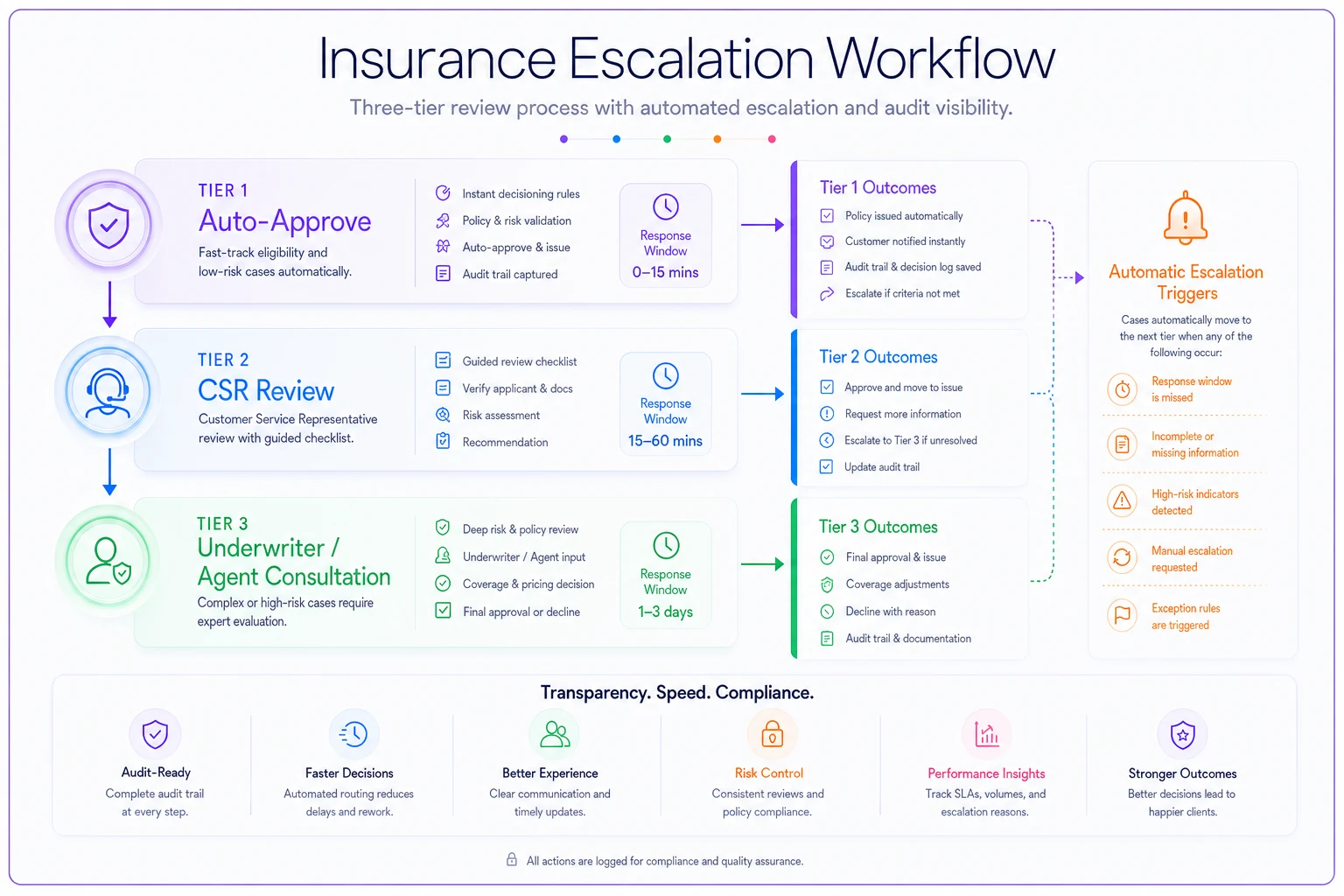
The flow visualizes how an exception moves from instant auto-handling to human review and finally to underwriter consultation if needed.
Tier 1: Auto-approve with documentation
-
Coverage increases within 20% of current limits
-
Additional insured requests for scheduled locations
-
Certificate issuance for existing coverages
Tier 2: CSR review with guided checklist
-
New location additions for existing operations
-
Class code additions within the same industry category
-
Equipment scheduling under $50k value
Tier 3: Underwriter/agent consultation
-
Operations expansion into new territories
-
Product liability modifications
-
Claims history anomalies
Each tier needs different response times. Tier 1 processes instantly. Tier 2 within 4 hours. Tier 3 within 24 hours. Miss those windows and automatic escalation kicks in.
The override audit trail
Every compliance system needs overrides. The question is whether you're tracking them well. Most agencies let staff override with a notes field and call it done. Three months later, nobody remembers why the marijuana dispensary has the same compliance rules as the florist next door.
-
Carrier-approved exception (with document upload)
-
Pending endorsement (with expected date)
-
Business classification error (with corrected classification)
-
Seasonal operation variance (with active months)
-
Grandfathered coverage (with original policy date)
Then track override patterns by user, account type, and carrier. When one CSR is overriding liquor liability requirements 50 times a month, you've either got a training problem or a broken rule.
Carrier integration points that determine success
Your compliance automation is only as good as your carrier connections. Most agencies integrate backwards—starting with data feeds instead of decision points.
Critical integration checkpoints
| Integration Point | What to Pull | Common Miss |
|---|---|---|
| New business submission | Carrier-specific compliance requirements | Only pushing application data, not pulling carrier rules back |
| Mid-term changes | Carrier rules for mid-term vs. renewal | Assuming renewal rules apply mid-term |
| Claims-triggered reviews | Claims feeds for proactive checks | Finding out at renewal when carrier non-renews |
| Audit discrepancies | Audit results to trigger similar-account reviews | Waiting for each account's audit individually |
New business submission — Don't just push application data. Pull back carrier-specific compliance requirements. Each carrier has different thresholds for what triggers additional underwriting. Integrate their rules, not just their forms.
Mid-term changes — This one gets forgotten constantly. Carriers often have different rules for mid-term versus renewal changes. A class code addition might be fine at renewal but trigger re-underwriting mid-term. Your automation needs to know the difference.
Claims-triggered reviews — When claims hit certain thresholds, carriers want immediate compliance reviews. Most agencies find out during renewal when the carrier non-renews. Integrating claims feeds lets you run proactive compliance checks before that conversation happens.
Audit discrepancies — Premium audits surface compliance issues months after the fact. Integrate audit results to trigger immediate reviews of similar accounts. If one contractor gets hit for misclassification, check your other contractors before their audits roll around.
The carrier portal trap
Half your carriers offer "automated compliance checking" through their portals. Sounds great until your team is logging into eight different systems with eight different rule sets—and starts gravitating toward whichever carrier has the loosest requirements.
Build a translation layer instead. Pull carrier requirements into your central system. When carriers update their rules (usually quarterly), update your central logic. Your team works from one workflow, while still respecting carrier-specific requirements underneath.
Building vs. buying: the compliance automation reality check
Most agencies start the conversation around build versus buy. That's the wrong question. The better one is: how much of your current process is actually worth automating?
What to automate first
-
Expiration date tracking
-
Coverage limit validation
-
Additional insured certificate matching
-
Basic class code verification
Get these running reliably before touching anything complex. Each automated check should eliminate at least a couple hours of weekly manual work. If it doesn't, keep it manual.
The integration problem nobody mentions upfront
Your compliance system needs to talk to your management system (policy data), carrier systems (requirements and updates), certificate management (usually a separate tool), document management (for override documentation), and email systems (for escalation alerts).
Every integration point is a potential failure point. One agency spent around $50k on compliance automation only to find out their 15-year-old management system couldn't export the required data. Their CSRs ended up doing double entry—once in the old system, once in the new compliance tool. Not exactly the outcome they were after.
Where AI-powered software actually helps
This is where AI-powered operational software makes a real difference—not replacing human judgment on complex compliance, but handling routing and escalation logic intelligently. Instead of rigid rule engines, you get adaptive workflows. The system can read unstructured carrier bulletins, pull context from claim notes, and route exceptions to the right person with the relevant background already surfaced.
It also learns patterns over time. It starts recognizing that your manufacturing accounts often need pollution coverage even when not explicitly flagged. It figures out when a "restaurant" is actually a food truck and needs different compliance handling entirely.
More practically, good AI automation can explain its decisions. When it escalates a compliance issue, it surfaces context: "Escalating because this contractor's operations description mentions structural steel erection, which typically requires higher limits than current coverage provides." That's genuinely useful—not just a flag in a queue.
Making compliance automation stick
Agencies that succeed with this share a few things in common.
They start narrow. One line of business, one carrier, one workflow. Prove the model before expanding. One general contractor specialist automated COI tracking for their top 50 accounts and spent six months refining it before rolling it out further.
They track the right metrics. Not "compliance checks completed" but false positive rate and escalation accuracy. One agency discovered their automation was flagging around 200 issues monthly, but only about a dozen were real problems. They spent months tuning rules to fix that ratio.
Start with one carrier and one workflow to validate real-world results before scaling.
They treat automation as an ongoing process, not a finished project. Carriers change requirements. Regulations shift. New coverage types appear. Your automation needs regular reviews—quarterly at minimum—or it degrades into something worse than doing it manually.
Compliance scenarios that still need human judgment
Multi-state operations — Each state has different requirements. A contractor working across state lines might need different coverage in each location. Automation can flag the complexity but can't determine the right solution.
Product recall exposure — Whether a food processor needs product recall coverage depends on their distribution chain, not just their operations description. Automation can prompt the question—it can't assess the risk.
Professional liability gray areas — The line between GL and professional liability gets blurry fast. An engineering firm doing construction management might need both, neither, or something hybrid. That requires a conversation, not a rule check.
Subcontractor compliance — Validating subcontractor insurance isn't just about checking certificates. You need to verify coverage territories, additional insured status, waiver of subrogation, and primary/non-contributory language. Automation can collect documents. It can't verify what those documents actually say in context.
When automation makes compliance worse
Sometimes automation creates more problems than it solves.
If your agency handles mostly unique, complex accounts, extensive automation might not make sense. A specialist MGA writing energy-sector policies probably needs human review on most things. The compliance requirements are too varied and too critical.
High staff turnover also makes automation harder to sustain. Every new person needs training on both the manual process and the automated exceptions layered on top. If your team changes every six months, simpler processes will serve you better than sophisticated ones.
Rocky carrier relationships are another red flag. One agency automated decline notifications only to find out they were declining accounts their underwriter would have accepted with a quick conversation. The automation removed the human dialogue that used to save those accounts.
Successful compliance automation for high-risk commercial lines isn't about catching every possible issue. It's about building escalation workflows that know their own limitations.
Start with clear tier definitions. Know exactly what your system can handle versus what it should hand off. Build your exception library from actual experience, not hypothetical scenarios. Track your override patterns to find broken rules before they cause real problems.
Compliance automation is about reducing friction, not eliminating judgment. Your experienced underwriters and agents know things the system never will. The goal is automation that amplifies their expertise, not one that tries to replace it.
Agencies that get this right treat it as operational improvement, not transformation. They're not building perfect systems. They're catching obvious problems fast so their teams can focus on complex situations that actually need human expertise. In commercial insurance, that's where the real value lives anyway.
Ready to transform your insurance agency operations?
Join 500+ agencies using Covixly to reduce manual work, improve client service, and grow their book of business.